Tracking Sales Performance and ROI in Magento
At the core of any Magento e-commerce website is a fundamental business objective to generate sales revenue and ultimately profit.
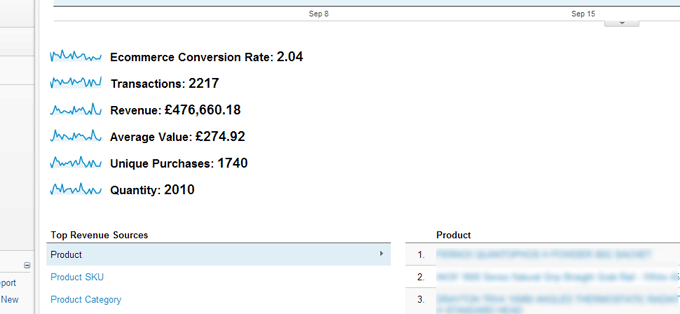
At Soap we are accountable to our clients for our ability to develop solutions that will generate sales and a key part of this knowing the ROI on the marketing channels we use. This process relies upon accurate and detailed reports from which we can make strategic marketing decisions. For this we use a variety of tracking tools some of which are standard Magento features, for example ‘out of the box’ Magento does an excellent job of integrating Google Analytics Ecommerce Tracking and a sample of the reporting is shown below:
Why Use the Magento ROI Tracker Extension
However support for additional third party ROI Trackeing tools does not come as standard with Magento and they can be troublesome to integrate. Over the years we have developed a number of Magento conversion tracking tools that help capture the data for ROI reports and we have compiled some of these for release in the form of the Magento ROI Tracker Extension. This extension currently supports Bings Ads Conversion tracking on Magento (formerly Microsoft adCenter), Google Adwords tracking, Shopping.com ROI Tracker and Addshoppers
What Magento ROI Tracker Extension Does
The Magento ROI Tracker adds the functionality to trigger the Google Adwords conversion tracking code on the Magento ‘thank you’ page once a customer has placed an order. The extension also adds similar support for the Shopping.com ROI Tracker.
How to Install the Magento ROI Tracker Extension
To install the Magento ROI Tracker tool simple copy the key from the ROI Tracker page on Magento Connect and install via Magento Connect Manager located under the system menu in your Magento admin
How to configure the Magento ROI Tracker Extension
Shopping.com ROI Tracker
- Enable: This disables/enable the Shopping.com conversion tracking code from appearing on the post order/thank you page
- Account Number: This is your shopping.com account number
Google adWords Tracking Code
- Enable: This disables/enable the Adwords conversion tracking code from appearing on the post order/thank you page
- Conversion ID: This is your unqiue Adwords account ID
- Language: The site language on which the Adwords code is placed on
- Label: This is the conversion name specified in your Adwords account that you defined
- Colour: This is the colour of Adwords notification box displayed to the customer
Microsoft adCentre Tracking (Bing Ads)
- Enable: This disables/enable the Adwords conversion tracking code from appearing on the post order/thank you page
- Domain ID: This is your unqiue Bing Ads account ID
AddShoppers Tracking Code
- Enable: This disables/enable the Adwords conversion tracking code from appearing on the post order/thank you page
- Account Number: Your AddShoppers account number

How to setup AddShoppers ROI Tracking code for Magento Video
How to setup Shopping.com ROI Tracking in Magento Video
How to Track Google Adwords in Magento Video
How to track Bing Ads (Microsoft AdCentre) In Magento Video
Talk to Us
Going forward we are looking to include the option to specify a Google Adwords Remarketing code in the Magento add-on however if you have any other suggestions or improvements we would love to hear from you in the comments below. Alternatively if you have a specific Magento Development Project you would like us to look then please feel free to get in touch




Paul Sturrige
November 2nd, 2012
Can you tell me if this tool will support Magento 1.4? If not could you let me know when it will?
Adam
November 2nd, 2012
Paul, unfortunately we are not looking to extend the extension to support the earlier versions of Magento, however it ‘may’ work – let us know how you get on.
Thieu
December 17th, 2012
I installed it and save my configuration settings? What do I do from here? How can I track the conversions? Do I need to add anything to the success.phtml file?
Adam
December 18th, 2012
Thats all you need to do. The extension automatically adds the relevant jscript tracking codes to your success page for you
Bryan
January 10th, 2013
Does this work along side the default Magento Google code or overrides it? i.e. Can I use this tracker for only shopping.com and Bing and use the default Google that comes with Magento?
Adam
January 14th, 2013
If you mean the Google Analytics Ecommerce Tracking code that Magento supports out the box – then yes. The ROI extension works alongside it
Eric
February 1st, 2013
What’s the additional functionality resp. benefit of the ROI Tracking extension’s Adwords feature when already using the default Magento Adwords ecommerce tracking?
Adam
February 1st, 2013
Magento out of the box doesn’t support Adwords tracking. I think you may be confusing it with Google Analytics Ecommerce tracking which is part of a default Magento installation?
Bill
February 20th, 2013
Hi, does this work with Magento 1.6? Thanks.
Adam
February 27th, 2013
Magento 1.6 doesn’t support the new EU Cookie Law options introduced in 1.7 that allows for disabling tracking. Without testing I would say no, however it is perfectly possible it will work fine
sean
February 26th, 2013
is this compatible with 1.6.x
Adam
February 27th, 2013
Sean, Hi I can only suggest trying the ROI tracker on a test site to see if it works. We have had some feedback from other users that it does work but we cant guarantee it would (see Bill’s comment earlier for details). However if you do try it and it does work then please post back your findings so as to help others using the extension on older version of Magento
Kazi Haque
March 3rd, 2013
Hi Adam,
Will this work for Yahoo Search Marketing Conversion tracking?
Bing is still not supported in Australia so we are still using old YSM.
Thanks
Adam
March 4th, 2013
Unfortunately it doesn’t support YSM. However if you want to post a link in the comments to the old conversion tracking code I will pass it on to the devs here to see if we can integrate for our Australian friends
Kazi Haque
March 4th, 2013
Hi Adam,
Thanks for your reply. appreciated it.
I Installed YSM code in our Magento store manually. as per Yahoo’s direction, i put the tag in on 2colums-left.phtml template which uses in checkout.xml for tracking.
On our YSM dashboard, we can only see conversions BUT no revenue data showing. Asked Yahoo support BUT no help.
I read a blog post where author mentioned additional code:
$y_orderid = Mage::getSingleton(’checkout/session’)->getLastRealOrderId();
$y_order_details = Mage::getModel(’sales/order’)->loadByIncrementId($y_orderid);
$y_saleamt = $y_order_details->subtotal;
?>
I used it before YSM default code BUT it messed up our website. I don’t know how to put this code along with Yahoo default code:
<!– Yahoo! Search Marketing Australia & NZ
window.ysm_customData = new Object();
window.ysm_customData.conversion = "transId=,currency=,amount=";
var ysm_accountid = "–Yahoo Account ID–";
document.write("”);
// –>
Any help would be much much appreciated.
Thanks
Carlos Luca
March 4th, 2013
Hello
I installed the module, but I need help in configuring, adworks is showing the site where the ads.
I need to be shown the ads that bring sales in my store.
Any tips?
Adam
March 5th, 2013
I’m not 100% sure on the question but I if ive guessed correctly you want to see what products are being sold via your Adwords advertising? If so you can get this information for Google Analytics simply goto Conversions > E-commerce > Overview > Product Performance. Then under “Advanced Segments” chose “Paid Search Traffic” then under “Secondary dimension” Select “Ad Group”. You will need to have ensured your Analytics account is linked to your Adwords and that you have enabled Ecommerce tracking in GA. I hope this helps
tim stijntjes
March 26th, 2013
Hi Adam,
I am using magento 1.6.2 and onestepcheckout from APPTHA, does you solution works in this scenario?
thanks,
.tim
Adam
March 28th, 2013
Tim, yes the tracking codes are applied to the thank you page post checkout
David Rogers
April 23rd, 2013
Hey, Adam. Great work…! Any chance that you’d consider adding Nextag and Shopzilla support any time soon?
Adam
April 25th, 2013
David, its on our radar along with porting the extension to Magento 2
Eli
May 26th, 2013
Hello Adam,
in Chrome tag assistance says
Error: Conversion ID should not have quotations around it.
Can you help me on this?
Adam
May 29th, 2013
Eli, hi. Have you tried the plugin on the default theme? Do you have the same problem with the ROI Tracker. As this is the first instance it would most likely fall in the camp of a theme issue – double check and let me know how you get on